RJTech Computer Center: Local Computer Center in Isulan, Sultan Kudarat
Finding a nearby computer center can make a difference when you need computer-related products, accessories, equipment, or information without traveling far from home.
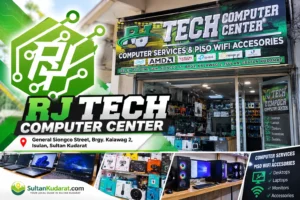
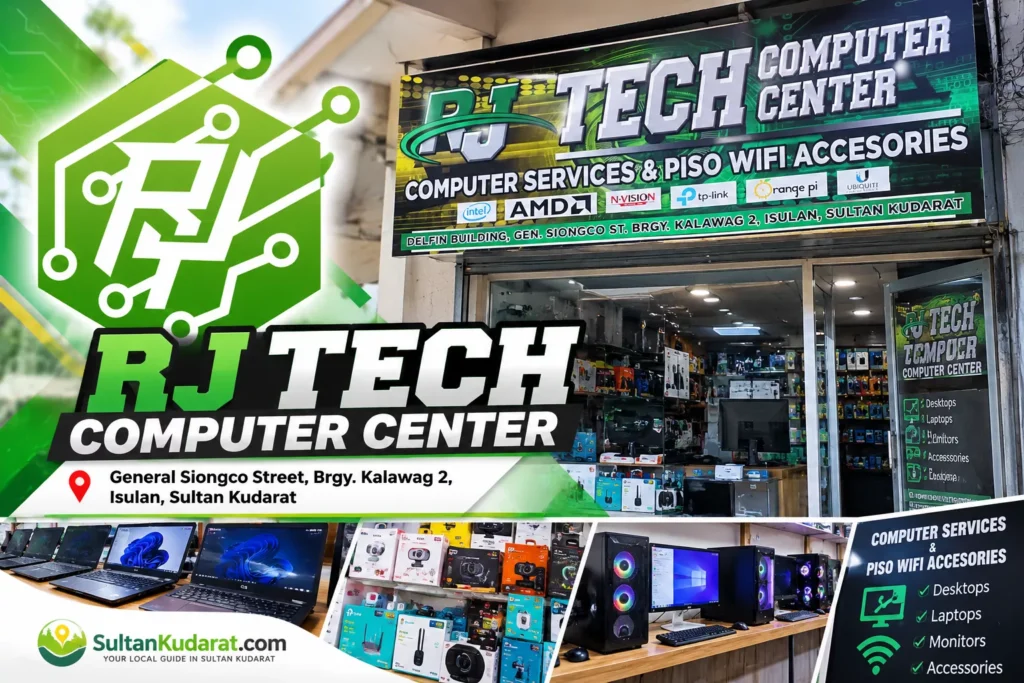
For residents of Isulan and nearby communities, RJTech Computer Center Isulan is a local computer business situated along General Siongco Street, Barangay Kalawag 2, Isulan, Sultan Kudarat 9805.
The business provides another local option for people searching for computer-related establishments within the municipality. Its location in Kalawag 2 can be convenient for students, professionals, families, entrepreneurs, and other computer users who prefer to inquire locally before traveling to larger commercial areas.
As computer technology continues to play an important role in education, work, communication, business, entertainment, and everyday transactions, having computer-related businesses within the community gives residents more choices when they need technology products or assistance.
If you are planning to visit RJTech Computer Center, it is recommended that you contact the business beforehand to confirm its current operating status, opening hours, available products, services, and exact directions.
Quick Information About RJTech Computer Center Isulan
Here are the available business details for people searching for RJTech Computer Center in Isulan, Sultan Kudarat.
| Business Detail | Information |
|---|---|
| Business Name | RJTech Computer Center |
| Business Category | Computer Center |
| Ownership Type | Sole Proprietorship |
| Street Address | General Siongco Street |
| Barangay | Kalawag 2 |
| Municipality | Isulan |
| Province | Sultan Kudarat |
| ZIP Code | 9805 |
| Country | Philippines |
| Facebook Contact | RJ Tesoro |
| Current Hours | Contact the business to confirm |
| Current Products | Contact the business to confirm |
| Current Services | Contact the business to confirm |
Because business information, inventory, prices, and operating schedules can change, customers should verify current details directly before making a special trip.
Where Is RJTech Computer Center Located?
RJTech Computer Center is listed along General Siongco Street in Barangay Kalawag 2, Isulan, Sultan Kudarat.
Its location within Isulan makes it relevant to searches such as:
- computer center in Isulan
- computer shop in Kalawag 2
- computer store Isulan Sultan Kudarat
- computer accessories near Isulan
- local computer center Sultan Kudarat
- RJTech Computer Center Isulan
People coming from other barangays of Isulan may want to contact the business and request an updated map pin, nearby landmark, or detailed directions.
This is particularly useful for first-time visitors because street-level locations and storefront details can change over time.
Getting Directions Before You Visit
If you are unfamiliar with General Siongco Street, messaging the business before leaving home is a practical approach.
Ask for a recognizable nearby establishment or landmark and, when possible, request a current map location.
Customers traveling from outside Isulan should also confirm that the shop is open before making the trip.
Why a Local Computer Center Is Useful in Isulan
Computers are no longer limited to specialized offices or technology companies. They are part of everyday life.
Students use computers for research, school projects, presentations, online learning, and communication. Employees rely on them for reports, meetings, spreadsheets, documents, and collaboration.
Small businesses use computers for bookkeeping, inventory management, customer communication, social media, digital payments, printing, and online transactions.
Families use laptops and desktop computers for entertainment, communication, government services, online banking, shopping, and education.
Because of these different needs, access to a computer center in Isulan can be valuable to the local community.
Rather than immediately traveling to another city to look for computer-related products or assistance, residents can first check what is available locally.
Who May Find RJTech Computer Center Useful?
A computer center can potentially serve a broad range of customers because technology needs vary considerably from one person to another.
Students and Parents
Students increasingly depend on digital tools for their education.
Common activities include researching assignments, preparing documents, making presentations, attending online classes, communicating with teachers, and accessing educational platforms.
Parents looking for a computer for their children should consider the actual educational requirements before purchasing a device.
A computer intended primarily for documents, browsing, presentations, and online classes may have different hardware requirements from a machine intended for demanding creative applications or gaming.
When contacting RJTech Computer Center, parents and students can explain what they need and ask whether appropriate products are currently available.
Office Workers and Professionals
Professionals may need laptops or desktops that can reliably handle multiple applications throughout the working day.
Common tasks can include:
- Word processing
- Spreadsheet management
- Video conferencing
- Web applications
- Accounting software
- Presentations
- File management
- Cloud-based collaboration
Before buying a computer, consider the applications you use most frequently.
Small Business Owners
Technology has become particularly important for small and medium-sized businesses.
Even relatively small establishments may depend on computers for sales records, invoices, inventory, customer databases, accounting, digital marketing, and communication.
For local entrepreneurs in Isulan, being able to inquire about computer-related needs within the municipality can save time.
Home Computer Users
Households also have varying technology requirements.
Some people primarily need a computer for browsing and communication. Others use their machines for streaming, editing photos and videos, remote work, schoolwork, or gaming.
Knowing your intended use before shopping can help narrow down your choices.
What Should You Ask Before Buying a Computer?
Choosing a computer can become confusing when specifications contain unfamiliar technical terms.
You do not necessarily need the most expensive computer. A better approach is to choose hardware appropriate for your intended use and budget.
Ask About the Processor
The processor, or CPU, handles many of the computer’s fundamental operations.
Different processors are designed for different levels of performance. A computer used for simple browsing and documents does not necessarily require the same processor as one used for professional video editing, engineering applications, or demanding games.
Ask for the exact processor model rather than relying only on broad labels.
Check the RAM
Random Access Memory, commonly called RAM, affects how smoothly a computer can handle multiple programs and browser tabs.
Users who frequently multitask may benefit from more memory.
Before purchasing, ask how much RAM is installed and whether it can be upgraded later.
Compare Storage Options
Storage capacity determines how many files, applications, photos, videos, and other data can be kept on the device.
It is also useful to ask what type of storage is installed.
Solid-state drives, or SSDs, have become common because they can provide faster startup and application-loading performance than traditional mechanical hard drives.
Consider the Display
For laptop buyers, screen size and resolution can significantly affect everyday usability.
A larger display can provide more workspace but usually makes a laptop less portable. A smaller laptop may be easier to carry but provides less screen space.
Consider whether portability or a larger working area is more important for you.
Check Available Ports
Before purchasing a computer, look at its available connections.
Depending on your equipment, you may need USB ports, HDMI, audio connections, memory-card readers, Ethernet, or other interfaces.
This is especially important if you already own peripherals that you want to continue using.
Computer Accessories and Peripherals
A computer setup often involves much more than the main desktop or laptop.
Depending on the user’s needs, common computer peripherals and accessories may include keyboards, mice, monitors, speakers, headsets, webcams, storage devices, adapters, cables, cooling accessories, and networking equipment.
Availability at RJTech Computer Center should be confirmed directly because inventory can change.
Know What You Need Before Buying
When buying an accessory, bring or send the relevant specifications whenever possible.
For example, if you need an adapter, knowing the exact ports on your computer can help avoid compatibility problems.
If you are replacing a component, knowing the exact computer or motherboard model can also be helpful.
What to Consider When Buying a Laptop
Laptop buyers should evaluate more than performance specifications.
Portability matters because laptops are designed to be carried.
Consider:
- Screen size
- Weight
- Battery capacity
- Keyboard comfort
- Storage
- RAM
- Processor
- Webcam
- Wireless connectivity
- Available ports
- Upgrade possibilities
- Warranty conditions
A student who carries a laptop to school may value portability and battery life, while someone who mostly works from a desk may prefer a larger screen.
What to Consider When Buying a Desktop Computer
Desktop computers can be a practical choice for homes, offices, businesses, and users who do not need a portable machine.
One advantage of many desktop systems is the ability to replace or upgrade individual components.
Before buying, determine whether the quoted price includes only the system unit or a complete package.
A complete setup may require a monitor, keyboard, mouse, speakers or headset, and other accessories.
Always clarify exactly what is included.
Ask About Warranty Coverage
Warranty information is an important part of any technology purchase.
Before paying for a computer or component, ask:
- How long is the warranty?
- Who provides the warranty?
- What does the warranty cover?
- What situations are excluded?
- Is proof of purchase required?
- What happens if the product develops a problem?
- Is the warranty handled by the seller or manufacturer?
Keep your receipt, warranty documentation, serial numbers, and other proof of purchase in a safe place.
Compare Based on Value, Not Just Price
The cheapest computer is not always the most economical choice over the long term.
At the same time, the most expensive machine is not automatically the right choice.
Think about overall value.
A suitable computer should provide enough performance for your current needs while remaining practical for your budget.
Consider performance, build quality, warranty, storage, memory, upgrade options, compatibility, and expected usage.
Computer Requirements for Online Learning
For students, reliability can be more important than advanced specifications.
A computer used for online learning should generally be able to handle common activities such as web browsing, video calls, document editing, presentations, educational websites, and file downloads.
A functioning webcam, microphone, speakers or headset, and reliable internet connection can also be important.
Before purchasing, students should check whether their school requires particular applications.
Computer Requirements for Work-from-Home Users
Remote work can require a different setup.
Employees who regularly participate in online meetings may want to consider webcam and microphone quality.
Those who work with large spreadsheets, numerous browser tabs, or multiple applications simultaneously may need additional memory and processing capability.
A comfortable keyboard, external monitor, and reliable network connection can also improve a home working environment.
Computer Needs for Local Businesses
Businesses increasingly depend on digital systems even when most of their transactions happen face to face.
A computer may support:
- Accounting and bookkeeping
- Inventory monitoring
- Employee records
- Customer databases
- Digital marketing
- Social media management
- Online ordering
- Email communication
- Document preparation
- Printing
- Business reporting
Small business owners should think about reliability and data protection as well as performance.
Regular backups are particularly important for business records.
Data Safety Should Be Part of Computer Ownership
Buying a computer is only the beginning.
Users should also protect their information.
Important habits include keeping the operating system updated, using strong passwords, avoiding suspicious downloads, and maintaining backups of important files.
Business owners should pay particular attention to sensitive customer and financial information.
Important documents should ideally not exist on only one device.
Keep Your Computer Updated
Software updates often include security fixes, stability improvements, and compatibility changes.
Ignoring updates indefinitely can leave a computer vulnerable to known security problems.
Users should keep their operating system, browser, security tools, and commonly used applications reasonably current.
Be Careful With Unknown Software
Not every program advertised online is trustworthy.
Avoid downloading applications from suspicious websites, particularly software that claims to provide unrealistic performance improvements or free access to normally paid products.
Malicious software can steal information, damage files, display unwanted advertisements, or compromise online accounts.
When uncertain, use official software sources or seek qualified technical guidance.
Back Up Important Files
Computer hardware can fail unexpectedly.
Accidental deletion, malware, physical damage, and storage failure can also result in data loss.
Students should back up important schoolwork, while professionals and business owners should maintain copies of essential documents.
Depending on the sensitivity of the data, backups can be stored on external drives or reputable cloud services.
Questions to Ask RJTech Computer Center Before Visiting
If you are planning a trip specifically to purchase something, contacting the business first can save time.
Ask about the exact product or service you need rather than simply asking whether the shop is open.
Useful questions include:
- Are you currently open today?
- What are your current business hours?
- Do you have the computer model I need?
- Is a specific accessory currently in stock?
- What are the current prices?
- What warranty comes with the product?
- What payment methods are accepted?
- Can you provide an exact location or map pin?
- Are technical or computer-related services currently available?
A clear inquiry gives the business a better chance of providing a useful response.
Contact RJTech Computer Center Through Facebook
RJTech Computer Center lists a Facebook account as its online contact channel.
Customers can use Facebook to inquire about the latest business information before traveling to the location.
When sending a message, include enough information about what you need.
For example, someone searching for a laptop could mention the intended use, approximate budget, and any important requirements.
This is more useful than simply asking, “How much is a laptop?” because computer prices vary considerably according to specifications.
Planning Your Visit to General Siongco Street
If this is your first time visiting the business, confirm the location before traveling.
RJTech Computer Center’s provided address is:
General Siongco Street
Barangay Kalawag 2
Isulan, Sultan Kudarat
9805 Philippines
Ask the business for an updated landmark or map pin if you are unsure where on General Siongco Street it is located.
Customers traveling from another municipality should especially confirm operating hours before making the journey.
RJTech Computer Center and Local Search in Isulan
People searching online do not always use the exact business name.
Someone may instead search for a computer shop in Isulan, computer center near Kalawag 2, or computer store in Sultan Kudarat.
RJTech Computer Center is relevant to these local searches because its provided address places it directly within Isulan.
For local residents, business profiles like this can help bring together essential information such as the business name, category, barangay, municipality, contact channel, and location.
Accurate local information is particularly important because people searching for a nearby establishment are often ready to call, message, ask for directions, or visit.
Supporting Local Businesses in Sultan Kudarat
Local businesses contribute to the commercial life of communities throughout Sultan Kudarat.
When residents shop locally, part of that economic activity remains within the community. Local establishments can also offer convenience by reducing the need to travel farther for everyday products and services.
Computer businesses have an increasingly important place in this environment because technology supports education, employment, entrepreneurship, communication, and government transactions.
A strong network of local businesses also gives consumers more choices.
Tips Before Making a Technology Purchase
Technology purchases can represent a significant expense, so avoid rushing into a decision.
Research the product and compare specifications carefully.
When comparing two computers, do not compare price alone. Look at their processors, memory, storage, displays, warranty conditions, and other relevant features.
Also consider your future requirements. A slightly better-equipped computer may be worthwhile when you expect your software requirements to increase, although there is little benefit in paying for features you are unlikely to use.
Frequently Asked Questions About RJTech Computer Center
Where is RJTech Computer Center in Isulan?
RJTech Computer Center’s provided business address is General Siongco Street, Barangay Kalawag 2, Isulan, Sultan Kudarat 9805.
What type of business is RJTech Computer Center?
RJTech Computer Center is categorized as a computer center.
Is RJTech Computer Center locally owned?
The provided business information identifies RJTech Computer Center as a sole proprietorship.
Is RJTech Computer Center located in Kalawag 2?
Yes. The provided address places the business in Barangay Kalawag 2, Isulan, Sultan Kudarat.
What is the ZIP code of RJTech Computer Center?
The listed ZIP code is 9805, corresponding to Isulan, Sultan Kudarat.
Does RJTech Computer Center sell laptops?
Current inventory has not been confirmed for this profile. Customers should contact the business directly and ask whether laptops or specific computer models are currently available.
Can I buy computer accessories at RJTech Computer Center?
Current accessory inventory should be confirmed directly with the business. If you need a particular item, send the exact product name, connector, specification, or computer model when making an inquiry.
Does RJTech Computer Center repair computers?
Current repair services have not been independently confirmed. Customers should contact RJ Tech Computer Center to ask whether computer repair, troubleshooting, upgrades, installations, or other technical services are presently offered.
What are RJTech Computer Center’s operating hours?
Current business hours were not provided. Contact the business before visiting to confirm the latest schedule.
How can I contact RJTech Computer Center?
The provided contact channel is the business owner’s listed Facebook account. Customers can send a message to ask about operating hours, products, services, prices, and directions.
Should I contact the business before visiting?
Yes. Confirming current hours, availability, and directions is recommended, particularly if you are traveling from outside Barangay Kalawag 2 or looking for a specific product.
What should I include when asking about a computer?
Tell the business your approximate budget, intended use, preferred laptop or desktop format, and any specifications you already have in mind.
Looking for a Computer Center in Isulan?
For residents searching for a computer center in Isulan, Sultan Kudarat, RJ Tech Computer Center is a locally based business worth knowing about.
Its provided location along General Siongco Street, Barangay Kalawag 2 places it within Isulan and makes it relevant for residents searching for nearby computer-related businesses.
Whether you are a student preparing for school requirements, a professional setting up a workspace, a business owner looking for technology equipment, or a household computer user, start by identifying exactly what you need.
Then contact the business to ask about current availability, prices, specifications, warranty information, and operating hours.
Discover More Local Businesses in Isulan and Sultan Kudarat
Finding reliable local information should be simple.
SultanKudarat.com helps residents and visitors discover businesses, establishments, destinations, services, food spots, accommodations, attractions, and community information across Isulan and the wider province.
Local business profiles can help customers know what is available nearby while giving establishments throughout Sultan Kudarat greater visibility online.
If you’re looking specifically for RJTech Computer Center Isulan, remember the key location details: General Siongco Street, Kalawag 2, Isulan, Sultan Kudarat 9805.
For the latest information, contact the business directly before visiting.